
You published a blog post eighteen months ago. It ranked on page one. It brought in leads every single week. Then, sometime last quarter, you stopped checking on it.
Now it’s on page three.
This is content decay, and it’s one of the most underdiscussed problems in SEO. Nobody talks about it because it’s invisible until the damage is already done. At Axiom360, we review decay reports for client sites every month, and the pattern is almost always the same: the pages losing the most traffic are the ones nobody has touched in over a year.
This guide breaks down what content decay actually means, what causes it, how to catch it early, and the exact process our team at Axiom360 uses to fix it.
What Does Content Decay Mean?
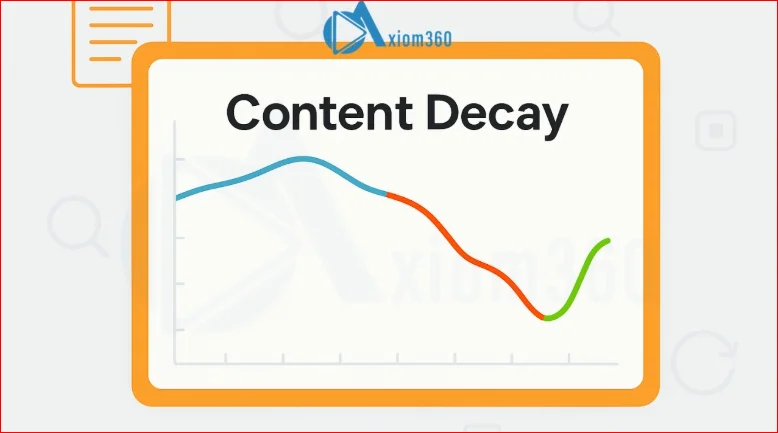
Content decay is the gradual, ongoing decline in a page’s organic traffic, rankings, or engagement over time, even though nothing on the page has technically “broken.” The URL still works. The content still reads fine. But the numbers keep slipping month over month.
It’s different from a sudden ranking drop caused by a penalty or an algorithm update. Decay is slow. It’s the SEO equivalent of a slow leak rather than a burst pipe, which is exactly why so many teams miss it until a quarter’s worth of traffic has already gone.
Search engines aren’t demoting your page out of spite. They’re simply finding other pages that answer the query better, more recently, or more completely than yours does right now.
What Causes Content Decay in SEO?
There isn’t one single cause. It’s usually a combination of a few of these:
- Outdated information. Stats, prices, screenshots, or product details that were accurate at publish are now stale, and readers (and Google) notice.
- Competitor content refreshes. Someone else updated their page. Google recrawled it. It now edges yours out for the same query.
- Shifting search intent. The query used to want a definition. Now it wants a comparison table, or a tool, or a video. Your page never adapted.
- Algorithm updates. Broad core updates periodically re-weight signals like E-E-A-T, helpfulness, and freshness, and older content that hasn’t kept pace can lose ground.
- Technical drift. Broken internal links, orphaned pages, slower load times, or a site restructure that quietly cut off the page’s link equity.
- Cannibalization. A newer page on your own site starts competing with the old one, splitting authority between them instead of consolidating it.
Understanding the cause matters because the fix is different for each one. A freshness problem needs an update. A cannibalization problem needs a merge or a redirect. Treating every decayed page the same way wastes time.
How to Identify Content Decay
Identifying decay early comes down to watching the right signals, not waiting for a dramatic drop.
Here’s what to check, page by page:
| Signal | What to look for |
| Organic traffic trend | A steady month-over-month decline over a 3–6 month window |
| Keyword rankings | Positions slipping from top 3 into positions 8–15 or beyond |
| Click-through rate | CTR dropping even when impressions stay flat or rise |
| Engagement metrics | Rising bounce rate, falling time on page, fewer scroll-throughs |
| Publish/update date | Anything untouched for 12+ months is a candidate for review |
| SERP features | Competitors now own the featured snippet or People Also Ask box you used to hold |
None of these alone confirms decay. It’s the combination, tracked consistently, that tells the real story.
How to Measure Content Decay
You can’t fix what you don’t measure, and content decay fneeds a repeatable measurement process rather than a one-off audit.
Here’s the framework we use with Axiom360 clients, adapted for a solo marketer or a small in-house team:
- Pull a traffic export from Google Search Console or GA4 for every published URL, going back at least 12 months.
- Segment by content age. Group pages into buckets: 0–6 months, 6–12 months, 12–24 months, 24+ months.
- Calculate the trend line, not just a single before/after number. A page can dip one month and recover; decay is about sustained direction.
- Set a decay threshold. Many teams use a 20% traffic drop over a rolling 90-day period as the trigger for review, though this can be adjusted based on your site’s traffic volume.
- Cross-reference with rankings for the page’s target keywords to confirm the traffic drop is ranking-related, not seasonal.
This is the same process our team runs during content audits, and it’s usually what surfaces pages the client didn’t even realize were slipping.
Tools to Detect Content Decay
You don’t need a huge stack to catch decay early. A few tools cover most of what’s needed:
- Google Search Console – free, and the most direct source for impressions, clicks, average position, and CTR trends per URL.
- Google Analytics 4 – for engagement metrics like time on page, scroll depth, and conversion drop-off.
- Ahrefs or Semrush – both have dedicated content decay or “content gap” reports that flag ranking and traffic loss automatically, and let you filter by page age.
- Screaming Frog – useful for catching the technical side of decay, like broken links, redirect chains, or thin content that’s crept in over time.
- A simple spreadsheet – genuinely underrated. Many teams track decay manually in a shared sheet with traffic pulled quarterly, and it works fine at smaller scale.
The tool matters less than the habit of checking it on a schedule. At Axiom360 UK, we still cross-check automated reports against a manual spreadsheet review each quarter, because tools flag the drop but rarely explain the “why” on their own.
How Often Should You Evaluate Content Decay
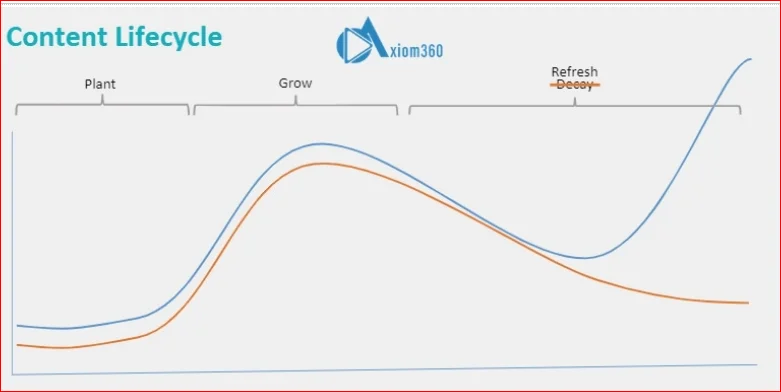
For most sites, a quarterly content audit is the right cadence. It’s frequent enough to catch decay before it compounds, but not so frequent that you’re chasing noise in the data.
That said, cadence should flex based on:
- Content volume. Sites publishing weekly should review high-traffic pages monthly.
- Industry pace. Fast-moving spaces like SaaS, AI, or finance decay faster because competitor content and information both change quickly.
- Page value. Pages that drive leads or revenue deserve a monthly check regardless of publishing volume, since the cost of losing that traffic is higher.
A good rule of thumb: audit everything quarterly, but keep your top 10–20 revenue-driving pages on a monthly watchlist.
How to Prevent Content Decay
Prevention is cheaper than recovery, and most of it comes down to building refresh cycles into your content process from the start rather than treating publishing as a one-time event.
Practical steps that work:
- Build update reminders into your content calendar, not just publish dates. A page isn’t done at launch.
- Avoid overly time-sensitive claims where possible (“as of 2026” ages better than “recently”).
- Interlink new content to older pages so authority keeps flowing to them instead of isolating them.
- Consolidate similar pages before they start competing with each other for the same keyword.
- Keep an eye on SERP changes for your money keywords, not just your own rankings.
Prevention won’t stop decay entirely. Search is dynamic by nature. But it stretches out the timeline significantly, which buys you more room to catch and fix issues before they cost real traffic. It’s the same principle Axiom360 builds into every content strategy from day one, rather than bolting it on later as damage control.
How to Fix Content Decay
Once a page is confirmed to be decaying, the fix depends on what’s driving it, but there’s a general order of operations that works well:
- Update the facts first. Stats, dates, screenshots, pricing, product names — anything factually stale gets corrected before anything else.
- Re-check search intent. Search the target keyword yourself and look at what’s currently ranking. If competitors now use tables, videos, or FAQs and you don’t, that’s your gap.
- Expand thin sections. Add depth where the page is currently shallow compared to what’s ranking above it.
- Refresh internal links. Point newer, relevant pages back to the decaying one, and vice versa.
- Update the publish date only after meaningful content changes have actually been made, not as a cosmetic fix. Google can tell the difference.
- Resubmit for indexing via Search Console once updates are live, to speed up recrawl.
This is close to how we approach content refresh work for clients: fix the facts, close the intent gap, then rebuild the internal signals around it.
How to Reverse Content Decay
Reversing decay is really the fix process taken further, with a bit more rigor around measurement so you can confirm the page has actually recovered rather than assuming it has.
A few things that separate a real reversal from a temporary bump:
- Track rankings weekly for the first 4–6 weeks after the update, since recovery isn’t always immediate.
- Compare against the pre-decay baseline, not just against last month. The real target is the page’s peak performance.
- Give it time before judging. Google typically needs several weeks to fully reassess a substantially updated page.
- Be willing to go further if a light refresh doesn’t move the needle. Sometimes a page needs a full rewrite rather than a touch-up, especially if the original angle no longer matches what people are actually searching for.
Some pages recover fully. Some recover partially and settle at a new, lower baseline because the market itself has changed. Both outcomes are normal, and it’s worth being honest with stakeholders about which one is realistic before promising a full recovery.
How to Train Your Team to Spot Content Decay Early
Content decay is easiest to manage when it’s not just one person’s job. Building the habit across a content or marketing team makes catching it early far more likely.
A few things that help:
- Give writers and editors visibility into traffic data, not just publishing targets. If the person who wrote a page never sees how it performs six months later, they have no reason to flag decay.
- Create a shared decay checklist so anyone reviewing a page knows exactly what to check, rather than relying on gut instinct.
- Assign page ownership, not just topic ownership. Someone should be accountable for how an individual URL performs over its lifetime, not just for hitting a word count at launch.
- Run a short monthly review where the team looks at the decay dashboard together. Ten minutes is often enough to catch patterns before they become quarter-long problems.
- Normalize updating old content as real, valued work, not a lesser task compared to publishing something new. Teams that only reward new output will always underinvest in maintenance.
This is also where a lot of Axiom360’s client work adds value beyond the audit itself: setting up the reporting and review habits so decay gets caught by the team, not just by an occasional external check.
Content Decay Best Practices
Pulling it all together, here’s what consistently works across the sites Axiom360 manages:
- Audit quarterly, with monthly checks on your highest-value pages.
- Set a clear decay threshold (a 20% drop is a common starting point) so review is triggered by data, not gut feeling.
- Fix facts before structure, and structure before adding more words.
- Update publish dates only when the content genuinely changes.
- Interlink old and new content continuously, not just at publish time.
- Give the team visibility into performance, not just publishing quotas.
- Treat refreshing old content as equal in value to publishing new content.
Content decay isn’t a sign that something went wrong. It’s a sign that search, competitors, and audience needs kept moving after you hit publish. The sites that hold their rankings longest aren’t the ones that never decay. They’re the ones that catch it early and treat maintenance as part of the SEO process, not an afterthought.
If you’re not sure how much of your own content library is quietly slipping, that’s usually the first thing worth checking before writing anything new at all. It’s exactly where Axiom360 starts with most new clients, and it’s often the fastest way to recover traffic without producing a single new page.
About the Author
Awais Maqsood is the Founder & CEO of DGSOL – The Creative Marketing Agency and Optilinko, an AI-powered SEO and marketing data platform focused on scalable growth. With 10+ years of experience in SEO, digital marketing, and data-driven strategy, he builds systems that turn marketing data into predictable revenue and long-term growth. He specializes in aligning SEO, PPC, and content with growth-led models to improve acquisition, retention, and lifetime value for SaaS and tech businesses, working at the intersection of AI, search intelligence, and performance marketing.
Feel free to connect with Owais Maqsood on LinkedIn for insights into SEO, SaaS growth strategies, AI-powered marketing systems, and data-driven digital marketing.
FAQs
What does content decay mean?
Content decay is the gradual decline in a page’s organic traffic, search rankings, or engagement over time, even though the page itself hasn’t been broken or removed.
What causes content decay in SEO?
Common causes include outdated information, competitor content updates, shifting search intent, algorithm updates, technical issues like broken links, and keyword cannibalization from newer pages on the same site.
How often should you evaluate content decay?
Most sites benefit from a quarterly content audit, with monthly checks on top-performing or revenue-driving pages, since decay can compound quickly on high-value URLs.
How do you fix content decay?
Start by updating outdated facts and details, then re-check current search intent, expand thin sections, refresh internal links, and update the publish date only once real changes have been made.
Can content decay be reversed?
Yes, in many cases. Updating and expanding a page, aligning it with current search intent, and refreshing internal links can restore lost rankings, though recovery can take several weeks to fully show up in search results.